

READ TIME: 8 MINUTES
Most CFOs are using Claude wrong.
They are unsure what the first prompt should be and how to get more accurate answers from Claude as a CFO. They don’t know how to use Projects and Skills.
With Claude, CFOs can run month-end close and do serious financial planning and analysis. Run variance commentary and build a board deck. But everything has to be accurate and it’s possible.
At our recent Claude Masterclass, Glenn Hopper showed our Insider members the version that actually works. Glenn is a real AI CFO who builds AI into finance teams for a living. He took one real month-end close and ran it end to end, live.
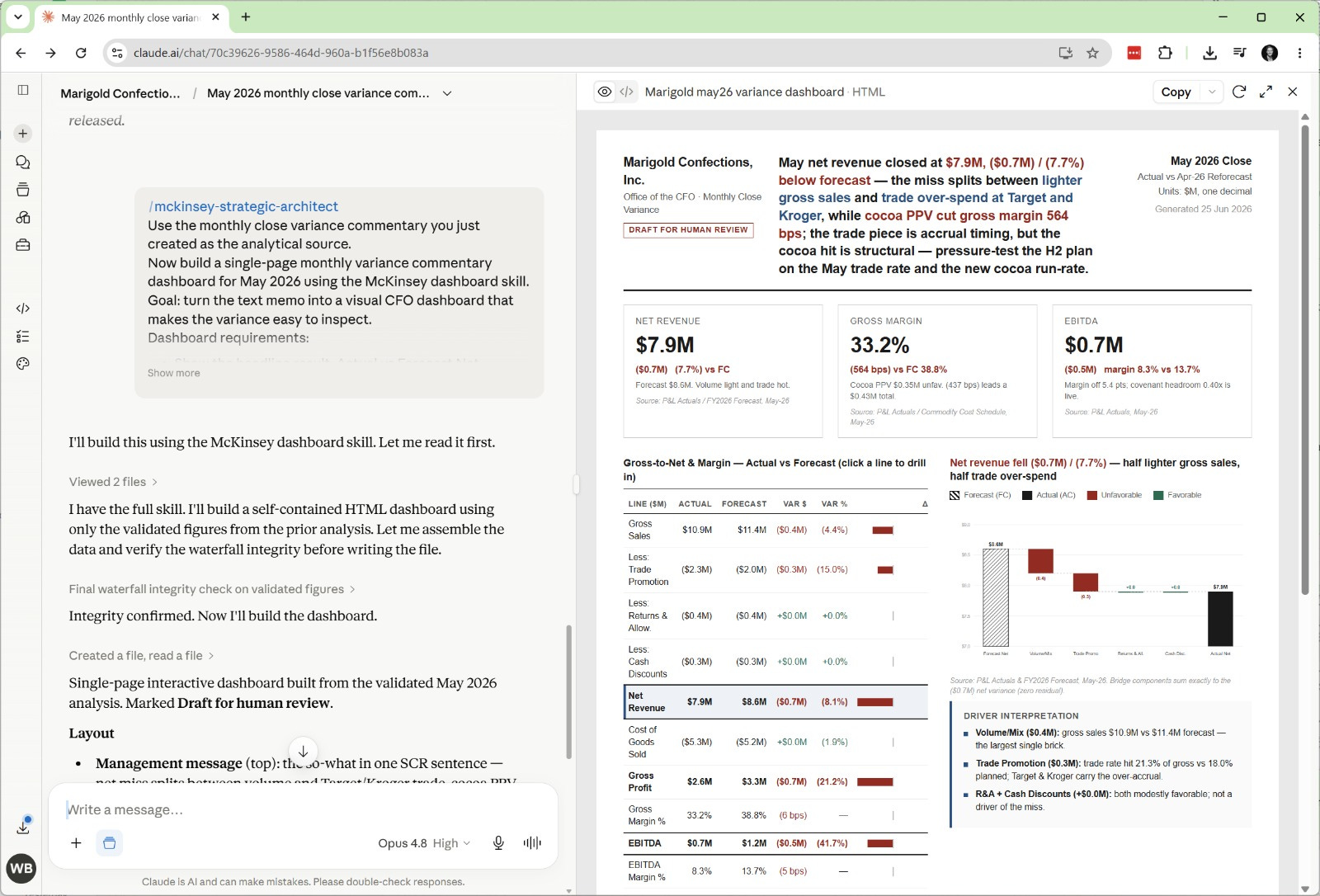
You must build a Project to hold the company’s context, run a Variance Commentary skill to produce the analysis, and then stack a second skill on top to turn that analysis into a board-ready dashboard. KPI tiles, a gross-to-net bridge, and a waterfall.
The difference is the architecture underneath Claude.
In today’s letter, you’ll learn how modern CFOs build a month-end variance dashboard in Claude using Skills and Projects.
You’ll get two ready-to-use skills.
Variance commentary skill (.md)
Mckinsey dashboard skill (.md)
And by the end of this newsletter, you’ll understand how to use multiple Skills, create projects and instructions. Upload the files, test projects, add skills and build a board deck to impress your CEO and the board.
Let’s dive in.
