

In 2018 I sold CXO Software to insightsoftware. A year later I was running the M&A function on the other side of the table.
I led the integration of Jet Global. I managed an integration team of 40 insightsoftware leaders across finance, product, sales, and operations. It was one integration. It was intense enough to change how I think about post-merger work forever.
What I realized is the textbooks will tell you M&A integration is a systems problem. It is not. It is a translation problem. Two chart of accounts, two close calendars, two policy manuals, two management reporting stacks, two finance teams.
Someone has to turn two into one while the business keeps running, the board keeps asking for synergy numbers, and half of both finance teams are quietly updating their LinkedIn profiles.
I did most of that work manually. PowerPoint decks. Excel mapping sheets. Endless calls. Late-night Slack threads. If I had Claude then, I would have run the first 100 days very differently.
This edition walks through exactly how.
I am going to highlight four finance workstreams that every integration lives and dies on:
Chart of accounts and management reporting mapping
Accounting policy and close harmonization
Finance systems integration planning
Synergy tracking and CFO control-tower reporting
Nothing else matters as much in the first 100 days. Communication, org design, and people decisions all compound on top of these four. But if the four above are broken, nothing else can hold.
And before you touch any of them, you need one thing in place first. Control and insight across the entire process. The CFO Integration Control Tower. That is where we are starting today.
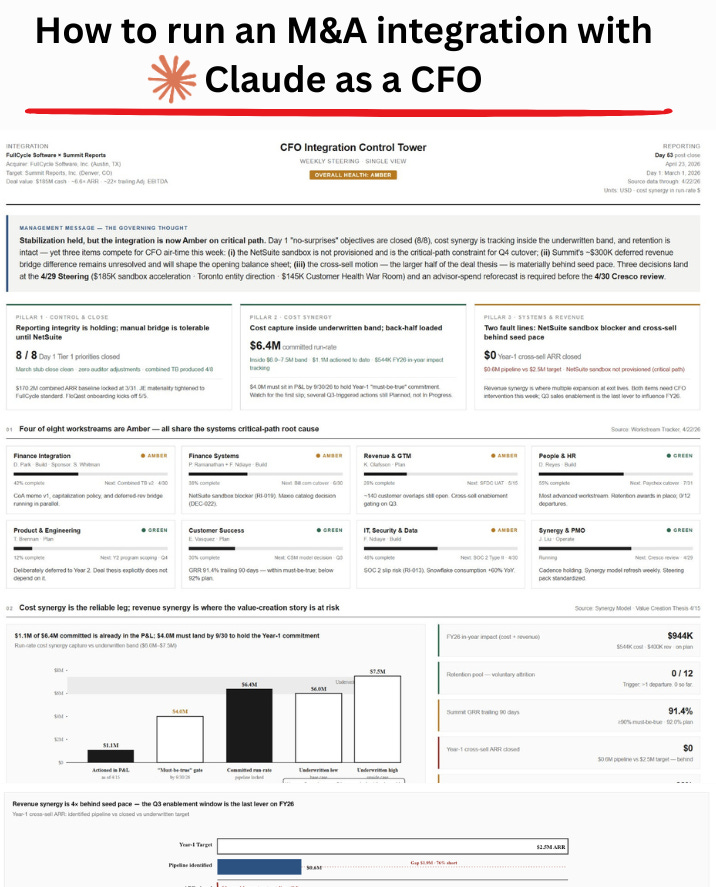
What follows is how I would run each one today with Claude Cowork.
Consider this the Claude M&A integration playbook for CFOs.
Let’s dive in.
How to run an M&A integration with Claude
FullCycle is acquiring Summit.
I am the CFO. We are on Day 53 post-close.
That detail matters. This is not a Monday-morning theoretical exercise. We are mid-integration. Stabilization is holding. Some workstreams are green. Others are amber. One decision is on the critical path. That is exactly why we need the control tower, because the control tower is what lets me see what has been done and what has not.
FullCycle Software, Inc. (parent) is a PE-backed B2B software company with a mature finance stack:
NetSuite as ERP
Salesforce as CRM
Maxio for subscription billing
Adaptive Planning for FP&A
FloQast for close management
Power BI for management reporting
Coupa for AP and spend
BambooHR and payroll provider for people data
Smartsheet for PMO tracking
Summit Reports, Inc. (target) is a smaller but growing reporting software company with more manual processes:
Microsoft Dynamics GP as ERP
HubSpot as CRM
Deferred revenue schedules maintained in Excel
Spreadsheet-based close checklist
Excel budgeting model
Power BI with Excel-based board pack
Bill.com for AP
BambooHR for HR
This is the of kind mismatch you should recognize. Different ERP logic. Different reporting structures. Different close rigor. Different maturity around subscription accounting.
The M&A Claude Setup for CFOs
I create a new Project called “Summit Integration” and select a folder with this structure: