

Ask a CFO if their team uses AI, and most will say yes.
Nitin Madan could have said yes too.
For more than three years he was CFO of a global bank’s India operations center, a hub of about 30,000 people.
His finance team had AI live in the close, in reconciliations, and in reporting. Then he scored his own function on a maturity model he built. The average came out at 1.7 out of 5.
Just using AI is not a level.
Before becoming the CFO at a top bank. He spent around 20 years as a consultant helping companies transform finance. He finished his tenure on September 30 (last month) and is back in advisory work. Here is his model, how to score yourself on it, and the story behind his 1.7.
Let’s dive in.
CFO AI Maturity Model
Nitin builds the model because fellow CFOs keep asking him the same questions at roundtables. His own team shows the problem. It has five use cases live and a few more in progress.
So yes, finance uses AI. But where are you in the AI journey?
His team can’t use AI for forecasting. It can’t use RAG or MCP. A handful of live tools tells him nothing about how mature the function really is.
So he scores it on technical parameters, the building blocks of AI in finance. He tests the model for a week with a few CTOs and CFOs to make sure it resonates.
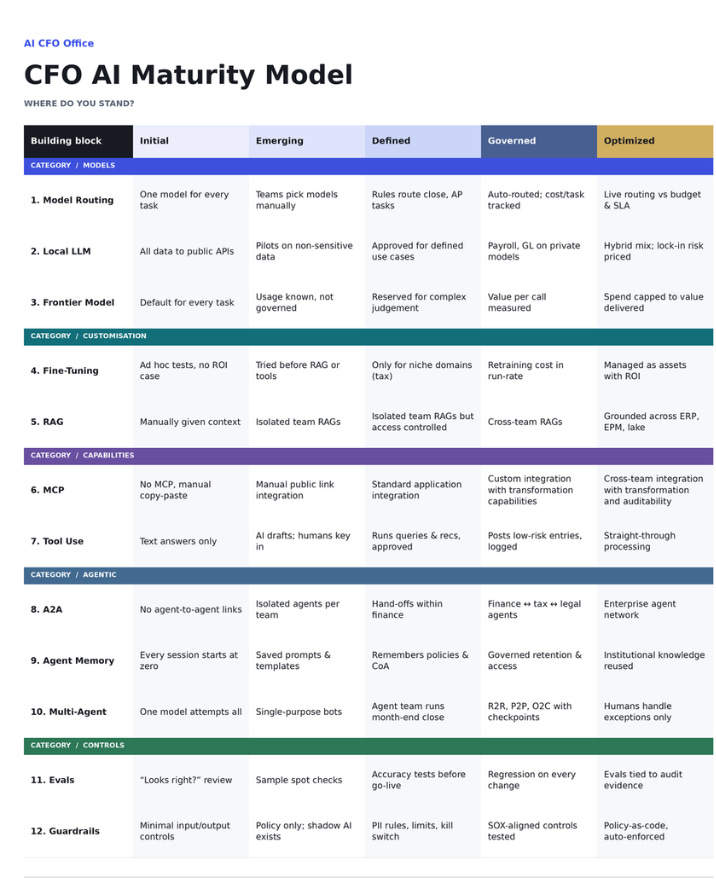
The model has 12 building blocks in five groups.
Each has 5 levels:
Initial
Emerging
Defined
Governed
Optimized.
How to score your team
Go through each row, pick the level that describes your team today, and average the 12 scores. Here is each row from level 1 to level 5, in the words of the model.
Models
Model routing. One model for every task. Teams pick models manually. Rules route close and AP tasks. Work is auto-routed, and the cost per task is tracked. Live routing against budget and service levels.
Local LLM. All data goes to public APIs. Pilots on non-sensitive data. Approved for defined use cases. Payroll and GL run on private models. A hybrid mix, with lock-in risk priced in.
Frontier model. The default for every task. Usage is known but not governed. Reserved for complex judgement. Value per call is measured. Spend is capped to the value delivered.
Customization
Fine-tuning. Ad hoc tests with no ROI case. Tried before RAG or tools. Only for niche domains such as tax. Retraining cost is in the run rate. Managed as assets with an ROI.
RAG. Context is given by hand. Isolated team RAGs. Isolated team RAGs, but access controlled. Cross-team RAGs. Grounded across ERP, EPM, and the data lake.
Capabilities
MCP. No MCP, manual copy and paste. Manual public link integration. Standard application integration. Custom integration that can transform data. Cross-team integration with transformation and auditability.
Tool use. Text answers only. AI drafts and humans key in. AI runs queries and reconciliations, with approval. AI posts low-risk entries, logged. Straight-through processing.
Agentic
Agent-to-agent. No links between agents. Isolated agents per team. Hand-offs within finance. Finance, tax, and legal agents work together. An enterprise agent network.
Agent memory. Every session starts at zero. Saved prompts and templates. It remembers policies and the chart of accounts. Governed retention and access. Institutional knowledge is reused.
Multi-agent. One model attempts everything. Single-purpose bots. An agent team runs the month-end close. Record-to-report, procure-to-pay, and order-to-cash run with checkpoints. Humans handle exceptions only.
Controls
Evals. Sample spot checks. Accuracy tests before go-live. Regression tests on every change. Evals tied to audit evidence.
Guardrails. Minimal input and output controls. Policy only, and shadow AI exists. PII rules, limits, and a kill switch. SOX-aligned controls, tested. Policy as code, enforced automatically.
When Nitin did this for his own function in a spreadsheet, some areas came out at 1, some at 2 and one at 3. The average was 1.7.
Then comes the part most people skip.
You do not need to reach level 5 everywhere.
Align it with your enterprise AI strategy. Is it possible? Is it not?
Then look at the business case and what it will cost.
He also said the model will keep evolving.
Next, he plans a version through an enterprise CFO lens.
Here is the story behind his 1.7.
AI failed in the board reporting
Nitin split his journey into stages, starting with board reporting.
In year one, board numbers came about a week after the hard close. Data came from many systems. He mentioned a survey that puts the average company of that size at 897 applications.
His bank ran more than 500, and finance owned about 300 of them. Everything had to flow into a finance data store after reconciliation before anyone could build the pack.
The next step was an analytics tool on top of that data store, with fixed slide formats and a rules engine that wrote the commentary. That cut the work to about a day. But the story was weak. In his words, it was a mathematic commentary.
Generative AI looked like the fix.
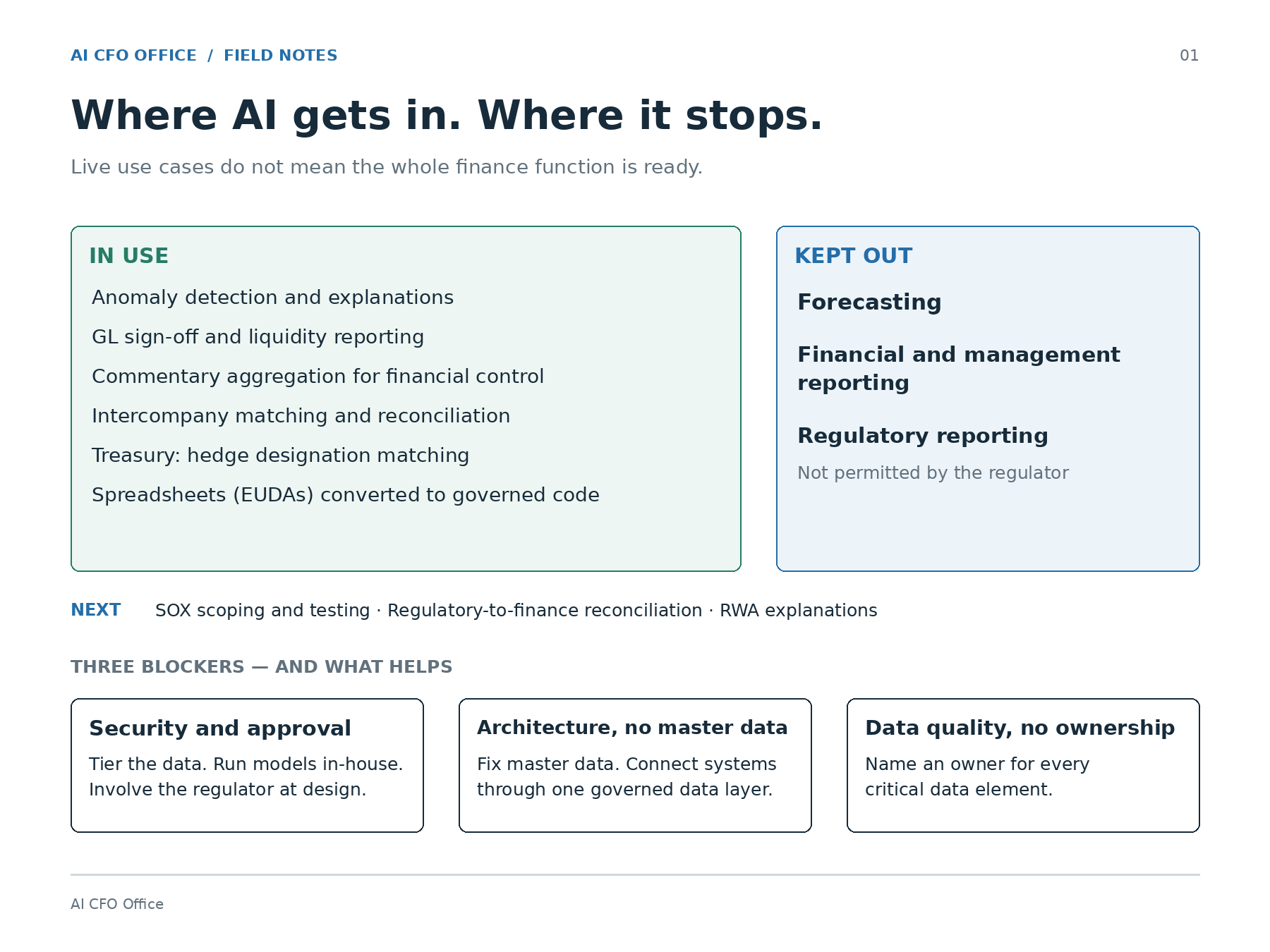
The team designed the whole solution. Then it stopped. All finance data at the bank was tagged as secret because it was a listed, regulated company. The security chief would not approve sending it to an AI tool.
“The tools were there, the use case was there, but it did not see the light of the day.”
Where AI did work
The wins came where the bank did not need to feed in the full data of an entity or a business. Nitin listed them:
Anomaly detection as part of the close, GL sign-off, and liquidity reporting
Aggregating commentary from around 20 entities into one readable story for the annual report
Intercompany matching and reconciliation
Treasury hedge spreadsheets and other Excel and macro tools, using AI to help with code
Reconciling regulatory reporting to financial reporting
Explaining risk-weighted assets
He also made a point I had not heard before. Early on, the best user of AI in financial services was the regulator.
“They get all the data in a very clean format.”
They used it to spot gaps between a bank’s reports and send back the errors. So the bank started using AI to find those gaps first.
What stayed off limits: forecasting, management reporting, and anything reported directly to the regulator.
Below, for paid subscribers:
How to keep a human involved at every step.
Why AI is a new data risk.
Why build on RAG.
How to budget AI.
How much of the forecast AI can take
How to start adoption and what to do this quarter.